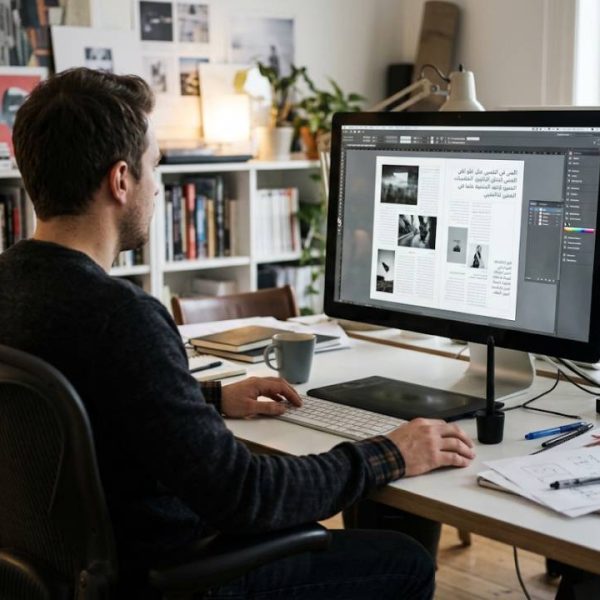
Translating a document from English into Arabic is only the first half of the job. The second half is making the translated text look right on the page. Arabic runs from right to left, connects its letters, and changes the way a whole layout is built. Skip that second step and even a perfect translation looks broken.
Why direction changes everything
In an English layout, the eye starts at the top left and moves right. In Arabic, it starts at the top right and moves left. Columns, tables, bullet points, page numbers and even images need to be mirrored so the reading order feels natural.
A mirrored layout is not a flipped picture. Logos, charts and photos usually stay as they are, while text blocks, tables and navigation move to the opposite side.
Letters that connect
Arabic letters change shape depending on their position in a word. A letter looks different at the start, in the middle or at the end. Software must handle this shaping correctly, otherwise letters appear isolated and unreadable.
Use a layout program that supports Arabic natively and set the paragraph direction before pasting any text. Pasting into an English template often gives scrambled punctuation and broken words.
Mixed content in one line
Real documents rarely contain Arabic alone. Brand names, product codes, URLs and numbers often stay in Latin script. These fragments run left to right inside a right-to-left sentence, which is where most errors appear.
Check each line where Arabic and English meet. Brackets, quotation marks and full stops can jump to the wrong side, and a single misplaced symbol can change how a sentence reads.
Numbers and dates
Arabic-speaking countries use different numeral systems. Western Arabic digits such as 1, 2 and 3 are common in North Africa, while Eastern Arabic digits are used in much of the Middle East. Agree on the system with your client before layout starts.
Dates need the same care. Some countries use the Gregorian calendar, others the Hijri calendar, and many show both. Confirm the format for every market.
Fonts and text size
Arabic scripts need more vertical space than Latin ones because of dots and marks above and below the letters. The same point size can look smaller than English text, so adjust sizes and line spacing after testing.
Choose fonts designed for Arabic and make sure the license covers print and digital use. A font that lacks certain characters will replace them silently with a fallback, which spoils the look of the page.
Why the translator and the designer must talk
Text length often changes after translation, and the translator may need a short phrase or a different structure. If the designer has already fixed the layout, the two must agree on a version that fits. Early collaboration saves several rounds of corrections.
When you need professional help, a specialist team for Arabic translation services combines native linguists with layout experts, so the text and the page are reviewed together.
Review the final file, not the draft
Always proofread the finished layout, not just the translated text file. Look at line breaks, hyphenation, punctuation and the order of numbers. A native reader should check the final PDF page by page.
Many problems only appear once text is in place: a word cut at the wrong spot, a table with reversed columns, or a heading that no longer fits on one line.
Subtitles and video in Arabic
Right-to-left text also affects video. Subtitles need correct punctuation, readable line lengths and good timing, and burned-in captions must be positioned so they do not hide key images. Common mistakes in subtitle projects are explored in our article on subtitle translation errors, and many of them apply to Arabic as well.
Standards for multilingual pages
Web pages need the same attention. Declaring the language and direction of each page helps browsers display text correctly and helps assistive tools read it aloud. The W3C guidance on text direction explains how to set direction in HTML so mixed content behaves as expected.
Plan the file handover
Ask for editable source files, such as InDesign or Illustrator documents, together with fonts and linked images. Give the translator a PDF for context, but never send only the PDF if a layout is needed.
Agree on file names and versions. A simple naming rule with the language code and date prevents the wrong file from being printed or published.
A short checklist
Before you start, confirm the target market, numeral system, calendar and font. During production, use native tools and keep translator and designer in touch. Before release, have a native reader approve the final file page by page.
This list takes a few minutes to follow and prevents most of the problems that make Arabic documents look unprofessional.
Closing thoughts
Good Arabic documents come from teamwork between translation and layout. Respect the direction, check the details where scripts meet, and review the finished page. Your readers will notice the difference immediately.
Layout choices become even more important in long, structured files. Teams that use technical translation services can check headings, tables and warnings in the target language before publication. A manual that looks right is easier and safer to follow. Small formatting fixes at this stage prevent bigger misunderstandings later.